
FAQ - Deltastock MetaTrader 4
To start trading with your live account, you need to change the trading server, since live accounts are serviced on a different server from demo accounts. Open the MetaTrader 4 Terminal and go to File/Login. The following dialog appears:
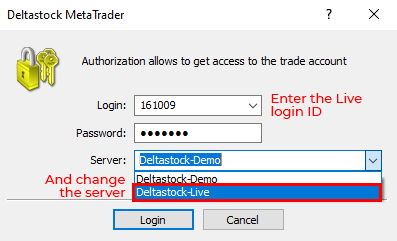
1. In the "Login" field enter the login ID, which you were given when you opened the Live MT4 account.
2. In the "Password" field enter your password.
3. From the "Server" dropdown choose Deltastock-Live
4. Then press "Login"
MT4 Live Server - 193.28.250.68:443
MT4 Demo Server - 193.28.250.66:443
Some MQL4 Expert Advisors only work when the execution mode of the instruments they trade with is "Instant". In this mode the MQL4 function OrderSend() can accept stop loss and take profit levels as parameters.
When the execution mode of the instrument is "Market", the SL and TP parameters should be 0 when OrderSend() is called. The SL and TP should be set after the order has been executed with the OrderModify() function.
The execution mode of all instruments in Deltastock MT4 is "Market", so you need to modify your EA a little bit in order for it to work.
You should correct EACH OrderSend() line in your advisor the following way. Instead of:
ticket1 = OrderSend(Symbol(), OP_BUY, Lot11, Ask, Slippage, SL, TP, "Buy_01", id1, 0, Blue);
You should use:
ticket1 = OrderSend(Symbol(), OP_BUY, Lot11, Ask, Slippage, 0, 0,"Buy_01", id1, 0, Blue);
if(ticket1 > 0){
OrderSelect(ticket1, SELECT_BY_TICKET, MODE_TRADES);
if(OrderModify( ticket1, OrderOpenPrice(), SL, TP, 0, Blue) == FALSE)
{
Print("OrderModify failed with error #",GetLastError());
}
}
i.e. you need to check the stop loss and take profit values in EACH SendOrder() function and replace them by 0, then call OrderModify() setting absolutely the same values for SL and TP.
You can find more about the MT4 execution modes in the MetaTrader 4 help files.
In the MetaTrader 4 platform the clients can see only charts which are based on the BID (Buy) price - the price a client can sell at. When a client's BUY order is executed, it will be executed at the ASK (Sell) price, which is higher from the BID price, seen on the chart. As a consequence, you may not see the execution price on the chart. The difference between the BID and ASK prices of the traded financial instrument is the spread. Spreads in Deltastock MT4 are variable, so it is possible that the difference between the BID and ASK prices has different values at certain times.
Target spreads on all FX pairs offered in Deltastock MT4 can be found here.
In the MT4 platform, all executed orders are considered as opened positions, despite the fact that your net position may be equal to zero at a given time.
Note: The spreads in the Deltastock MetaTrader 4 platform are variable, so they may widen significantly at certain times (especially during important news releases or periods of low market liquidity). The widening of the spreads will increase (respectively, decrease) the negative (respectively, positive) result from your opposite positions. This will lead to a decrease in your equity, and therefore all your open positions may be closed due to insufficient funds in your trading account.